

|
|
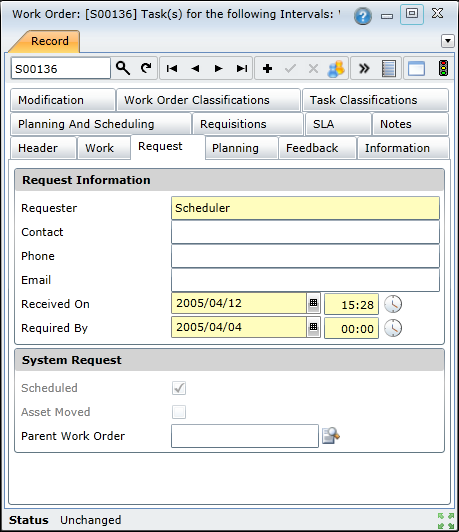
Data fields
The following data fields are captured or displayed on the Work Order - Request tab.
|
Field |
Description/Setting |
|
Request Information |
|
|
Originator |
Name of the contact that originated the work order. |
|
Requester |
Name of the person who initiated the Request, defaults to the current user’s User Name. |
|
Contact |
The name of the person to contact about the Asset. |
|
Phone |
The Contact person's phone number. |
|
|
The Contact person's email address. |
|
Received On |
Calendar date and time when the Request was recorded, defaults to today's date. If required, select another date from the Lookup. |
|
Required By |
Calendar date and time when the work is required, defaults to today's date and time. If required, select another date from the Lookup. |
|
System Request |
|
|
Scheduled |
Ticked for a scheduled Work Order that was created from a Proposed Work Order. Not ticked for an unscheduled Work Order. |
|
Asset Moved |
Ticked if the Asset has been moved from its original parent as a result of a Work Order for the move. |
|
Parent Work Order |
Only for a Follow Up Work Order. The inspection Work Order for which this Follow Up Work Order was added. |